Download the Ingenovis Health Mobile App for Travel Nurses and Healthcare Professionals
Built for healthcare professionals on the go, the Ingenovis Health Mobile App makes it easier to search jobs, manage credentials, stay connected with recruiters and discover new opportunities across the Ingenovis Health family of companies.
What Is the Ingenovis Health Mobile App?
The Ingenovis Health Mobile App is a healthcare job search and career management platform built specifically for travel nurses, allied health professionals and other clinicians on the go.
Users can search healthcare jobs, update their professional profile, manage credentials, track applications and access opportunities across the Ingenovis Health family of companies from a single mobile experience.
The app is designed for healthcare professionals who want a more efficient way to manage the next step in their careers. Travel nurses, allied health professionals and other clinicians can manage your profile with a single login across the Ingenovis Health family of companies, helping you search jobs faster, keep credentials current and remain application-ready wherever your career takes you.
Why Healthcare Professionals Use the Ingenovis Health Mobile App
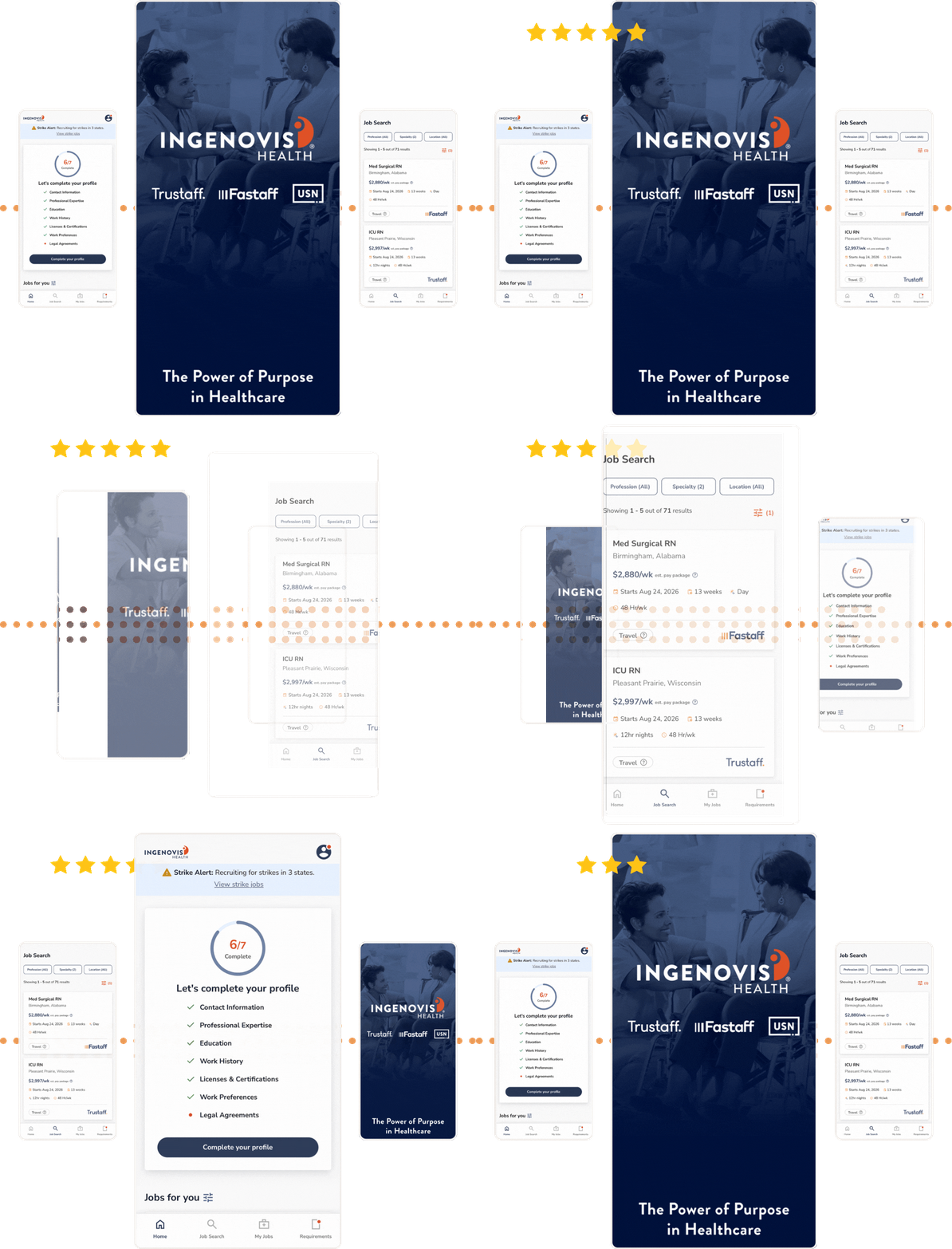
Healthcare professionals are constantly balancing patient care, changing schedules, credential requirements, education and future career opportunities. The Ingenovis Health Mobile App helps simplify your professional life by bringing job search, employment profile and document management together in one convenient platform.
Whether you're searching for your next travel assignment, updating your profile or submitting your weekly timesheet, the app makes it easier to stay organized no matter where you are. With a single login, users can access a wide variety of job opportunities across multiple trusted healthcare staffing brands, including Trustaff, Fastaff and USN, while keeping their professional information current and accessible all in one place.
A Simpler Way to Manage Your Healthcare Career:
🚀 Search Jobs Faster
Find healthcare jobs that match your specialty and preferences with enhanced search options.
✅ Stay Application-Ready
Easily update your profile, work history and credentials so you're prepared when new opportunities arise.
🗂 Manage Credentials Anywhere
Upload and organize licenses, certifications and required documents directly from your mobile device.
🌎 Access More Opportunities
Explore jobs across the Ingenovis Health family with one account—no more juggling multiple profiles.
🚨 Instant Job Alerts
Whether it's the perfect job in the perfect town or a high-paying crisis job, get notified as new opportunities open.
🪴 Benefits at Your Fingertips
Once you're on assignment, access critical info about employee benefits, timesheets, clinical support and more.
Manage Your Profile On the Go
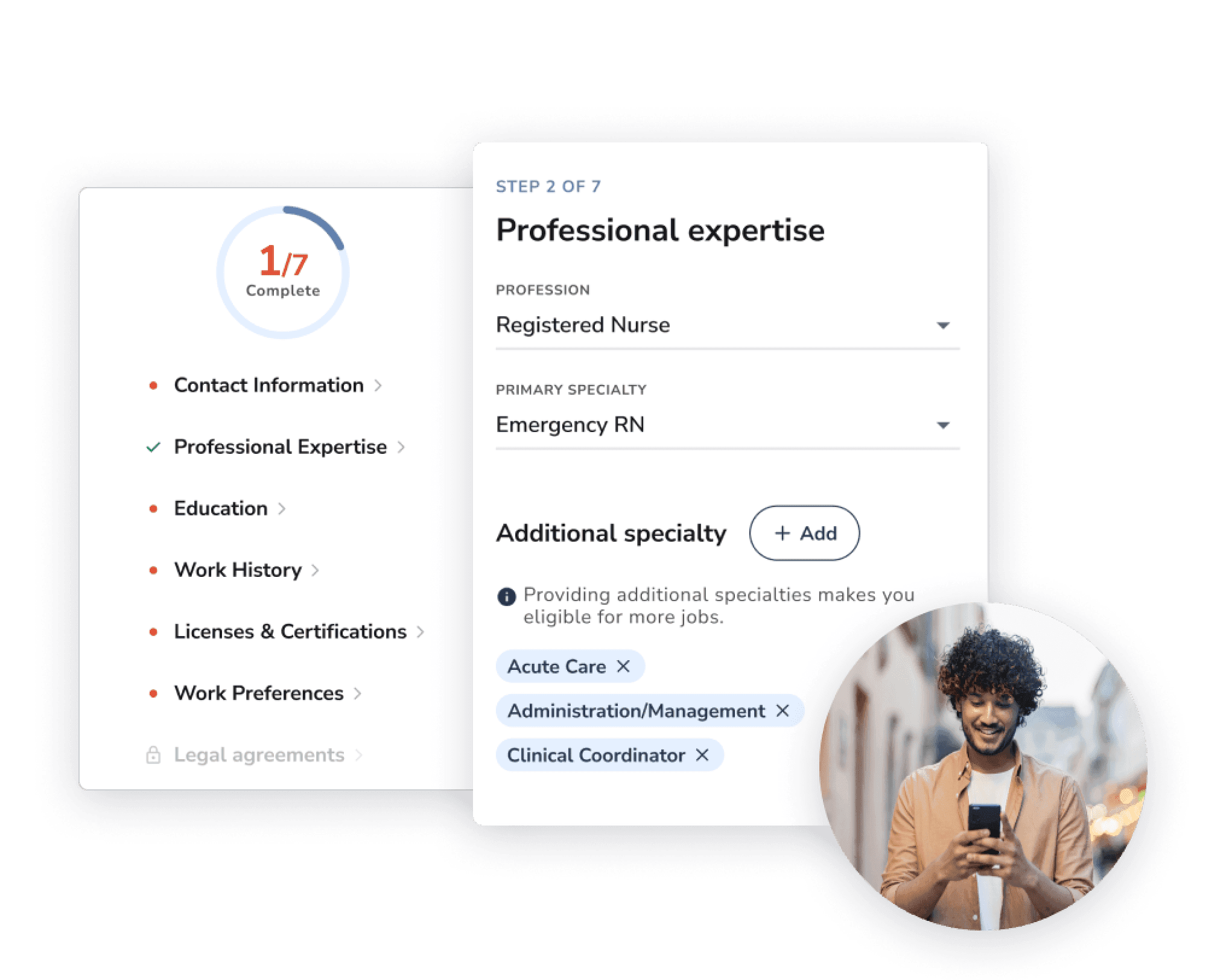
Your professional profile plays an important role in helping recruiters connect you with the right healthcare job opportunities. The Ingenovis Health Mobile App makes it easy to keep your experience, skills, certifications and career preferences up to date wherever you are.
Keep Your Information Current: Add new assignments, certifications, licenses, skills and work history directly from your phone so recruiters always have the most accurate view of your experience.
One Profile, More Opportunities: Managing profiles across multiple healthcare staffing companies can be time-consuming and frustrating. With the Ingenovis Health Mobile App, one profile gives you access to opportunities across the Ingenovis Health family of companies, reducing duplicate work and making it easier to explore more types of jobs.
Upload Your Resume to the App: Easily upload an existing resume to the app as a starting point, then maintain a complete professional profile that helps recruiters better understand your experience, specialties and qualifications.
No Laptop Required: Whether you're finishing a shift, traveling between assignments or spending time with family, you can update your profile, upload documents and respond to recruiter requests right from your phone. No need to pause your day and wait until you're back at a laptop to make important updates.
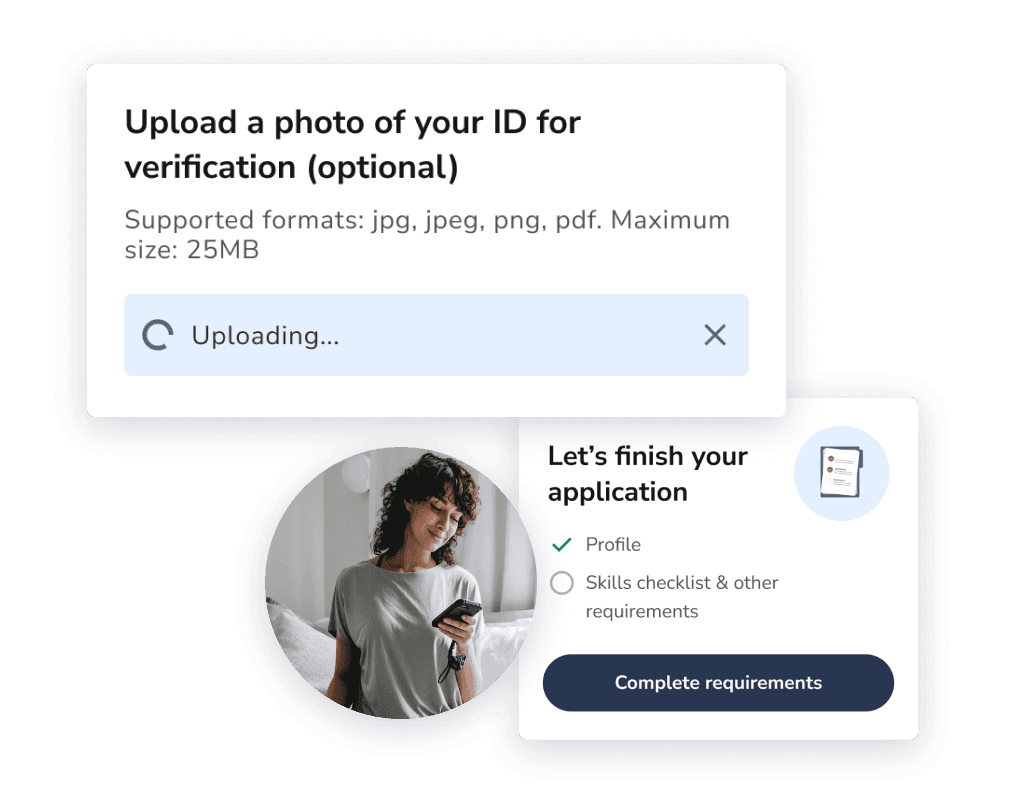
How the Ingenovis Health Mobile App Works

Create Your Profile
Create an account and add your specialties, preferred shift, career preferences and basic job history.

Search Healthcare Jobs
Filter thousands of travel nursing, allied health and healthcare job opportunities and save your favorites to your profile.

Upload Credentials
Securely upload your licenses, certifications and career documents directly to the app.

Apply and Connect
Apply to jobs with a single click, connect with a recruiter, track your application progress and get future job alerts.
Search Healthcare Jobs Faster
More Healthcare Jobs in One Place
Landing your next job shouldn't mean jumping between job boards, websites, emails and multiple staffing companies. The Ingenovis Health Mobile App helps healthcare professionals search faster by bringing thousands of healthcare jobs from different Ingenovis Health brands together in one convenient mobile experience.
Find Jobs That Match Your Preferences
Whether you're searching for travel nursing assignments, allied health opportunities, rapid response positions or just thinking about your next career move, the app makes it easier to find the jobs that match your goals. Personalized search filters allow you to narrow opportunities by type, specialty, location, shift, duration, pay preferences and more, helping you spend less time searching and more time applying for positions that fit your needs.
Compare Opportunities with Confidence
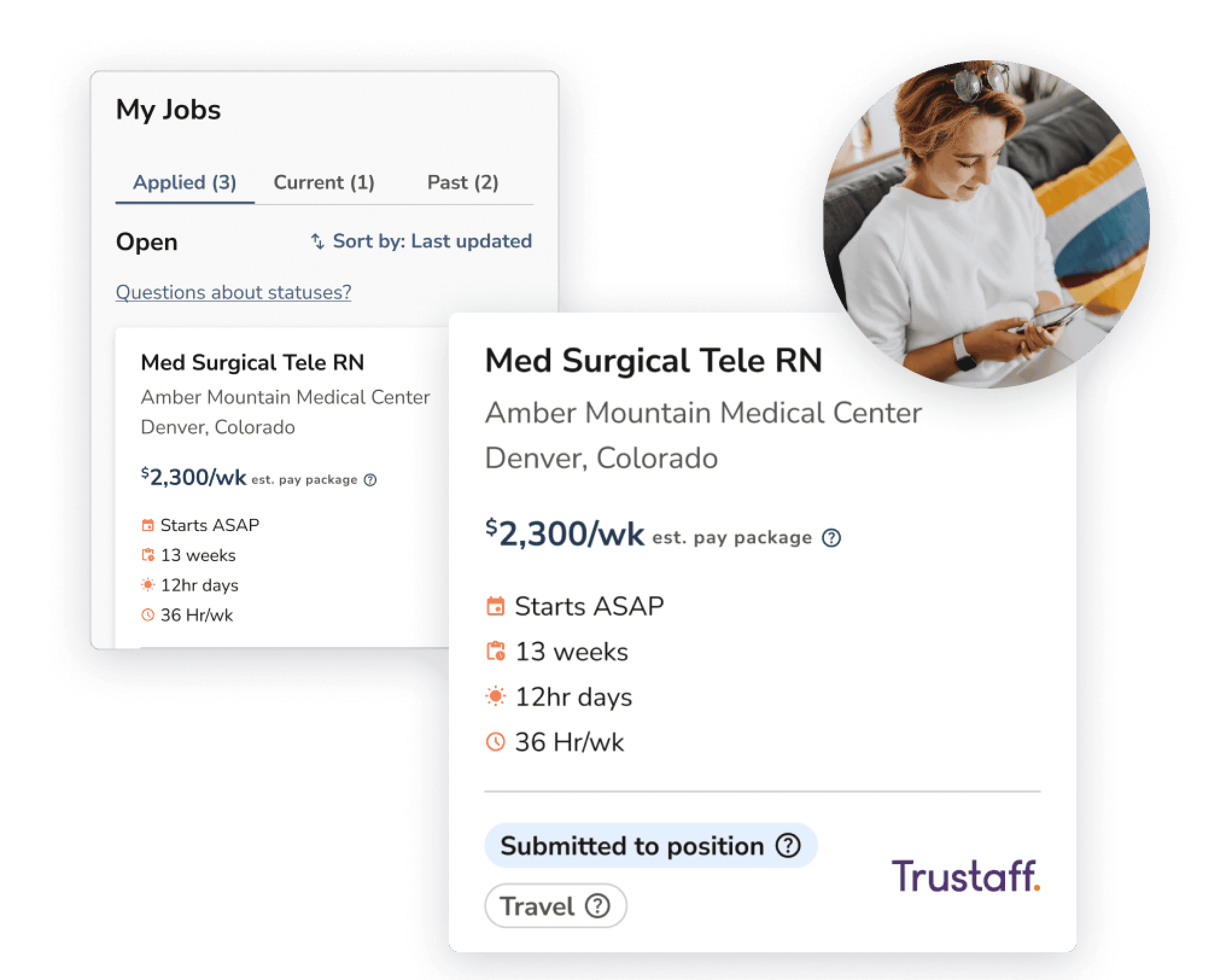
Greater pay transparency means fewer surprises during your job search. The Ingenovis Health Mobile App displays pay information directly within available job listings, so you can evaluate opportunities and compare assignments before applying. While final compensation may vary based on individual qualifications and discussions with your recruiter, having access to estimated pay upfront gives you more confidence as you explore your options.
Be Ready When New Opportunities Open
With real-time alerts for fast-moving job opportunities and the ability to apply with a single click using your profile information, you can respond quickly when the right opportunity becomes available. Instead of starting from scratch every time you apply, you'll have your professional information ready when you need it most.
See What Real Healthcare Professionals Are Saying
⭐⭐⭐⭐⭐ "The app makes it incredibly easy to navigate through and apply for available positions. I set just set my search and go." —Stacey S., RRT
⭐⭐⭐⭐⭐ "I like this much better than trying to update my resume line by line in my browser. It always took forever and this makes it easy." —Jane S., Travel RN
⭐⭐⭐⭐⭐ "I've worked for this company for years and using the mobile app is a level up. I feel more secure uploading my documents instead of sending them in email." —Helen N., RN
⭐⭐⭐⭐⭐ "I like getting an alert new jobs come out. I've been trying to get an assignment in Hawaii, and they move so fast!" —Samantha K., RN
⭐⭐⭐⭐⭐ "This is basically the updated Fastaff and USN mobile app combined with Trustaff. I love that now I don't have to do the same paperwork over and over." Juanita C., RN
⭐⭐⭐⭐⭐ "Very easy to search and I like that you can see the pay right on the jobs." —Carrie W., LPN
Mobile Career Resources for Healthcare Professionals
Frequently Asked Questions About the Ingenovis Mobile App
Getting Started
Who can use the Ingenovis Health Mobile App?
The Ingenovis Health Mobile App is built specifically for healthcare professionals, including travel nurses, allied health professionals, therapists and other clinicians seeking healthcare job opportunities and tools to manage the next phase of their career.
Is the Ingenovis Health Mobile App free to download?
Yes. The Ingenovis Health Mobile App is free to download and use on eligible mobile devices, giving healthcare professionals convenient access to job search and career management tools. There are no costs associated with the app and we will never ask for payment information.
How do I sign in to the Ingenovis Health Mobile App?
Signing in is simple. If you already have an account with IngenovisHealth.com, Trustaff.com, Fastaff.com or USNursing.com, you can log in using your existing username and password to access the Ingenovis Health Mobile App. This shared login experience allows healthcare professionals to move seamlessly between participating Ingenovis Health brands without creating multiple accounts.
Don't have an account yet? Simply follow the on-screen prompts to create a free account. The signup process will guide you through creating your profile so you can start searching jobs, uploading credentials and exploring opportunities right away.
Your account also works across both mobile and desktop experiences, making it easy to manage your profile, search healthcare jobs, upload credentials and connect with recruiters whether you're using the app or signing in through a web browser. With one login and one profile, you can access more opportunities while spending less time on red tape.
What devices support the Ingenovis Health Mobile App?
The Ingenovis Health Mobile App is available for both iOS and Android mobile devices, allowing healthcare professionals to search jobs, manage profiles, upload credentials and connect with recruiters while on the go. Whether you use an iPhone, iPad, or Android smartphone or tablet, you can access the app through the Apple App Store or Google Play Store.
Because the app is designed for mobile use, healthcare professionals can manage their careers from virtually anywhere without needing to be at a computer. This makes it easier to stay connected to new opportunities, update information and respond to recruiter requests while traveling, between assignments or after a shift.
Do I need a computer to use the app?
No. The Ingenovis Mobile App is designed to help healthcare professionals manage their careers from their mobile devices. You can search jobs, update your profile, upload documents, submit timesheets and respond to recruiter requests without needing a computer.
Travel Nurse FAQs
How can travel nurses find assignments faster?
Travel nurses can often find assignments faster by using mobile tools that provide job alerts, advanced search filters and quick-apply functionality. Instead of manually checking multiple websites, mobile apps allow clinicians to receive notifications when new opportunities matching their preferences become available.
The Ingenovis Health Mobile App helps travel nurses search opportunities by specialty, location, shift, assignment type, pay preferences and other criteria, making it easier to focus on assignments that align with their goals and apply quickly when the right opportunity appears.
Most importantly, the Ingenovis Mobile app saves your profile information and allows you to apply across multiple companies with a single click. You only have to maintain one profile and manage one log in, making it faster than ever to be first in line when the perfect job opens.
Can I manage travel nursing assignments from my phone?
Yes. The Ingenovis Health Mobile App allows travel nurses to search assignments, review job details, update their professional profiles, manage credentials upload documents and communicate with recruiters directly from their mobile devices.
In today's fast-paced job market, the ability to manage your healthcare career from your mobile device is more important than ever. Because travel nurses often work away from home and travel between assignments, mobile access helps them stay connected to new opportunities and important career information without needing to be at a computer.
Can I compare travel nursing jobs in the app?
Yes. The app provides detailed job information and estimated pay information on most listings, making it easier for travel nurses to evaluate and compare opportunities before applying. The simplified job cards make it easy to compare and contrast jobs in different areas.
Using search filters and available assignment details, clinicians can compare factors such as specialty, location, assignment length, shift requirements and estimated compensation to help identify opportunities that best fit their personal and professional goals. Final compensation may vary based on individual qualifications and discussions with a recruiter.
Healthcare Job Search FAQs
What types of healthcare jobs can I find in the app?
The app provides access to a variety of healthcare opportunities across the Ingenovis Health family of companies. Depending on your specialty and career goals, you may find travel nursing assignments, allied health positions, rapid response opportunities, strike assignment and other unique healthcare clinician roles. New jobs are added daily, giving users access to opportunities across a huge range of healthcare disciplines, skill levels and locations.
Can I search travel nursing jobs in the app?
Yes. Travel nurses can use the Ingenovis Health Mobile App to search travel nursing assignments based on their preferred specialty, location, shift requirements, assignment length and other criteria. The app is designed to make it easier for travel nurses to discover new opportunities and stay informed about assignments that match their career goals.
Can allied health professionals use the app to find jobs?
Absolutely. The Ingenovis Health Mobile App supports allied health professionals in addition to nurses and other clinicians. Allied health professionals can search available healthcare jobs, update their profiles, manage credentials and connect with recruiters regarding opportunities that align with their experience, certifications and career interests, including those that specialize in the ins and outs of their unique modality.
How do I find healthcare jobs that match my specialty?
The app includes search and filtering tools that help healthcare professionals narrow opportunities based on their specific areas of specialty and preferences. By maintaining an up-to-date profile and using available search filters, users can focus on jobs that align with their experience, skills and career goals rather than sorting through unrelated opportunities.
Can I filter healthcare jobs by location, shift or pay?
Yes. The Ingenovis Health Mobile App offers personalized search filters that allow users to refine results by criteria such as location, specialty, shift preferences, pay information, assignment type and other factors. These filters help healthcare professionals spend less time searching and more time evaluating opportunities that meet their specific needs.
You can also use the app's dynamic search feature to quickly find relevant opportunities. Simply start typing a specialty, job title, location or keyword into the search bar, and the app will automatically suggest matching options as you type. This helps narrow down jobs faster and refine the search without manually browsing through hundreds of listings.
Pay & Opportunity FAQs
Why is pay transparency important during a healthcare job search?
Pay transparency helps healthcare professionals make more informed decisions throughout the job search process. When estimated compensation is available upfront, you can better understand the value of an opportunity and determine whether it aligns with their expectations before investing time in the application process.
Greater visibility into pay information can also help reduce uncertainty, improve opportunity comparisons and create a more efficient healthcare job search experience.
Keep in mind that estimated pay is only the start. You'll work directly with a recruiter to align your final compensation, which can vary based on factors like experience, specialty, location, certifications, urgency, benefits, bonuses and more.
Can pay information help me make better career decisions?
Compensation is about more than understanding what a single assignment may pay. Having visibility into estimated pay can help healthcare professionals identify market trends, compare opportunities across different specialties and better understand how compensation varies by location and assignment type.
For travel nurses and other clinicians, understanding pay differences between geographic regions can be an important part of long-term career growth and planning. By reviewing pay information alongside factors such as location, shift requirements, assignment length and specialty demand, healthcare professionals can make more informed decisions about which opportunities best align with their personal, professional and financial goals.
Does the app help me evaluate travel nursing assignments?
Yes. Travel nurses can review available assignment details directly within the app, helping them compare opportunities before applying. Factors such as location, shift, assignment duration, specialty requirements and estimated compensation can help clinicians determine which opportunities best support their professional and personal priorities.
Combined with job alerts and personalized search filters, the app helps travel nurses identify assignments that match their goals more efficiently. Be sure to review additional information on employee benefits, support and bonuses and factor than in to your final comparison.
Profile Management FAQs
Why is maintaining an updated healthcare profile important?
For certain types of jobs, like travel assignments, resumes are not the standard. Instead, you complete a professional profile with the hiring company, which is then submitted for consideration at each facility where you're considering traveling. That profile becomes your "foot in the door" to future jobs, so it's critical that it is accurate and up-to-date. Without a complete profile, you may miss out on fast-moving jobs.
An updated profile helps recruiters identify opportunities that align with your experience, skills and career goals. When your information is current, it becomes easier to match you with relevant healthcare jobs, travel nursing assignments and other opportunities that fit your qualifications.
Keeping your profile updated can also help streamline the application process and reduce delays caused by outdated information or missing details.
Can I update my profile from my phone?
Yes. The Ingenovis Health Mobile App allows you to update your professional profile directly from your mobile device. You can add new assignments, certifications, licenses, skills, references, and other career information whenever your experience changes.
Unlike many healthcare staffing platforms, the Ingenovis Health Mobile App allows you to maintain a single profile across participating Ingenovis Health brands, helping you access more opportunities without managing multiple accounts.
Can I upload my resume to the app?
Yes. You can upload your resume directly through the Ingenovis Health Mobile App and use it as a foundation for building and maintaining your professional healthcare profile. If you have an existing resume, it's a great way to save time when first completing your profile.
Can I use one profile across multiple Ingenovis Health brands?
Yes. The Ingenovis Health Mobile App uses a single profile and login experience across participating Ingenovis Health brands, making it easier to access more healthcare job opportunities while reducing duplicate data entry. No more juggling multiple profiles or uploading the same documents over and over; the app puts more types of jobs at your fingertips with a single profile.
What information should I keep updated in my profile?
To help ensure you're visible for relevant opportunities, it's a good idea to keep the following information current:
Work history and recent assignments
Licenses and certifications
Clinical skills and specialties
References
Location and assignment preferences
Contact information
Regular updates can help recruiters match you with opportunities that align with your current experience and career goals.
How does a complete profile help recruiters find the right opportunities for me?
Recruiters rely on profile information to understand your experience, certifications, specialties, location preferences and career goals. The more complete your profile is, the easier it is for recruiters to identify opportunities that match your qualifications.
Your profile is the basis of what hiring managers will see. They'll use that information to gauge your fit to their unit, so it's important that it be as accurate as possible.
If you have a particular skillset that's in high demand, putting it on your profile helps you stand out.
A detailed profile can help recruiters reach out about relevant opportunities you may not have discovered on your own. Jobs open and close very quickly, and your recruiter will be able to clue you in to openings that may not have hit the mobile app yet, or recommend you to specific hiring managers at premier facilities.
Do I need a computer to manager my healthcare profile?
No. The Ingenovis Health Mobile App is designed to help healthcare professionals manage their careers from anywhere. You can update your profile, upload documents, add certifications, review opportunities and communicate with recruiters directly from your phone without needing to sit down at a computer.
This flexibility is especially valuable for travel nurses and clinicians who may be working nontraditional schedules, traveling between assignments or spending time away from home and can be a major advantage in your job search.
Healthcare Career Management FAQs
How can healthcare professionals manage their careers from a phone?
Modern mobile tools allow healthcare professionals to complete most career management tasks directly from their phones. This can include searching healthcare jobs, updating professional profiles, uploading credentials, communicating with recruiters, applying for new opportunities and managing the daily employment tasks once on assignment.
Mobile access makes it easier to stay connected to your career any time, any place without needing to pause your busy lifestyle to be at a computer.
Why should healthcare professionals use a mobile career app?
Healthcare careers don't always fit neatly into a traditional 9-to-5 schedule. Nurses, allied health professionals and other clinicians often work long shifts, nights, weekends and juggle a busy schedule. As a result, important career tasks such as exploring new opportunities, updating professional information, responding to recruiters or managing credentials may need to happen whenever time allows, not just when you're sitting in front of a computer.
A mobile career app gives healthcare professionals greater flexibility and control over their careers by making these tasks accessible from anywhere. Instead of delaying updates or missing opportunities because you're away from a laptop, you can stay connected to your career on your schedule, whether you're between shifts, traveling to your next assignment or simply planning your next professional move.
The best mobile career apps also help reduce the administrative burden of managing a healthcare career by bringing job search, profile management, credential organization and recruiter communication together in one convenient place.
What should I look for in a healthcare job search app?
When evaluating a healthcare career app, look for features that support both job searching and long-term career management, including:
Healthcare job search tools
Profile management
Credential management
Recruiter communication
Job alerts and notifications
Mobile document uploads
Pay visibility and job details
Security and convenience
The best healthcare job search apps help professionals stay organized while providing access to new career opportunities.
Applications & Recruiter FAQs
Can recruiters contact my through the app?
The app helps keep you connected with recruiters throughout your healthcare career journey. Recruiters may contact you regarding opportunities that align with your experience, specialty, location preferences and career goals.
Maintaining a complete and up-to-date profile can help recruiters better understand your qualifications and identify opportunities that may be a good fit.
Will recruiters only contact me about jobs I apply for?
Not necessarily. Recruiters may also reach out about healthcare jobs and travel nursing opportunities that match your experience, skills and preferences, even if you haven't applied for those specific positions. Keeping your profile updated can improve your visibility and help recruiters connect you with opportunities you might not have discovered on your own.
Sometimes healthcare jobs open and close within the hour, so you want a recruiter in your corner who can give you the inside edge on jobs that may not have even made it to the website yet. With that in mind, a recruiter will connect with you about the job preferences you select in the app to get a feel for your career goals. That's a great time to let them know how you'd like to be contacted (and how often).
How does the app help recruiters match me to healthcare jobs?
Recruiters use the information in your profile to better understand your experience, certifications, specialties, work history and career preferences. The more complete and current your profile is, the easier it becomes to identify opportunities that align with your qualifications.
By combining profile information, job preferences and recruiter expertise all in one place, the app helps create more meaningful connections between healthcare professionals and potential opportunities.
Can I search for jobs and connect with recruiters at the same time?
Yes. The Ingenovis Health Mobile App is designed to support both independent job searching and recruiter-assisted career exploration. You can browse available healthcare jobs, apply directly to opportunities and communicate with recruiters while managing your profile and credentials from one platform.
As part of the normal job search process, you'll be contacted by a recruiter once you start your profile. From there, you can set expectations about your career goals and communication preferences.
Everyone likes to search a little differently. The mobile app gives healthcare professionals the flexibility to take an active role in their job search while still benefiting from recruiter support and expertise.
Mobile Healthcare Credential Management FAQs
Can I upload healthcare credentials from my phone?
Yes. The app is designed to make credential management mobile and convenient. You can upload licenses, certifications and other required documents directly from your phone, eliminating the need to wait until you're back at a computer to make important updates.
This flexibility is especially valuable for travel nurses and healthcare professionals who may be working irregular schedules, traveling between assignments or frequently away from home.
What documents can I manage in the app?
Healthcare professionals can use the app to manage a variety of career-related documents as part of their profile, including:
Professional licenses
Certifications
Resume and career documents
Credentialing forms
Other required employment and onboarding documents
Maintaining these materials on your mobile device in one location can help reduce administrative work and improve organization throughout your job search and career journey.
How does digital credential management help healthcare professionals?
Digital credential management allows healthcare professionals to keep important career documents organized, accessible and up to date. Instead of searching through email folders, cloud storage or paper files, clinicians can maintain critical documents within a centralized platform.
Having quick access to credentials can help simplify onboarding, support faster applications and make it easier to respond to recruiter requests.
Take the Next Step in Your Healthcare Career
Search healthcare jobs, explore travel nursing opportunities, manage credentials, update your professional profile, and connect with recruiters from one convenient mobile platform. Download the Ingenovis Health Mobile App today and take control of your healthcare career wherever it takes you.
Get started by downloading the app from the App Store or Google Play.